Around two weeks ago I had the experience of testing my disaster readiness in my home lab. To my surprise, I found it sorely lacking, which means that the circumstances, shortcomings, and fallout make a perfect candidate for a post on how not to manage your infrastructure.
Buckle up, because this will be a long enough story that it needs to be split across two posts.
Background
For a little bit of context here, around two weeks ago I finished a day of work and signed off to begin a much needed staycation; two weeks off of work to game, sleep in, and generally be a potato while things at the office were in a lul and my partner was out of town for a conference. One of my plans was to play a stupid amount of Factorio - I have a server which is hosted (along with a whole bunch of other stuff) on a relatively newish Dell Poweredge R620 - this will be important later. During the course of entering vacation mode, I watched some Netflix, upgraded the server to the latest game version, and browsed the Factorio mod portal for any mod updates or new additions that looked interesting and fun to play.
Before we move on, there are a few separate, but equally important facts to know about my infrastructure:
- I've been working on moving things to a standard OS and baseline configuration; 99% of my infrastructure runs Centos Stream 8.
- Everything was a VM running on the ESXi host, managed through vcenter (also deployed on that same host).
- My R620 used direct-attached storage.
One of the many things that was running on this server was a postgresql database, which was an outlier from the rest of my infrastructure in nearly every way:
- It was running Ubuntu Server
- It did not have centralized authentication to the host or the database server
- It was not regularly updated; the OS was running version 16.x LTS while the application was running postgresql 9.x - both of which have been EOL for an age now
Note the word was.
The Disaster
Going back to Factorio, I had browsed around and downloaded a few mod updates and one new one that looked fun. The Factorio mod update procedure for a server requires that you drop the mod zip archives in a folder and restart the server, which in turn automatically saves. My Factorio maps are long-lived (years, across multiple game versions), and gigantic (multiple gigabytes in size) so saving is a hefty operation that takes time and a fair amount of IOPS on a disk. Usually I take this opportunity to get up and move, and grab some water as it's very easy with Factorio to sit at the computer for hours on end if you aren't careful.
Cue the disaster; something like 90% of the way through saving, the Factorio server crashed. This in itself was unusual, as I can (literally) count on one hand the number of times a Factorio server has ever crashed (even a heavily modded one, like mine). It is easily one of the most stable pieces of software I have ever seen, given the number of crashes versus the number of hours it has spent running.
But okay, I thought, let's try that again.
I restarted the server (with a mental note that it seemed to take significantly longer than usual) and issued another save command. I waited a few moments as the save began, but then it froze and I got another wildly unfamiliar screen: connection to server lost. Something was clearly up, so I opened up a terminal to SSH to the server and poke around. To my surprise, I was unable to connect, not because of an issue with the server but because my internet was out.
At this point it was pretty clear that all was not well. I wasn't sure what was going on yet, only that the server was acting finnicky, my usually rock-solid network was having issues, and that those two extremely unusual and unlikely things were happening at the same time. My gut instinct was that it might be a routing issue because I had recently upgraded my gateway hardware for the first time in five years, but I wasn't sure.
The first inkling I had of a more severe problem was when I started to do some basic triage and diagnostics. I hadn't actually lost full network connectivity; I could still ping my gateway by it's IP address. Similarly, from the gateway I could reach an external IP address that I often use for testing it's connection. But I couldn't reach anything - internal or external by hostname or fqdn. It quickly became obvious that I had a DNS issue, which explained the connection loss but not exactly the server crash or the save/load speeds.
I wasn't sure what was going on with DNS, but as that was the most visible problem I decided to start there. My DNS server itself wasn't responding to SSH attempts by IP, which told me that there had possibly been a kernel panic for some reason, so after trying in vain a few times, I stepped out to the rack to check the monitor for my vcenter's IP address (something I didn't have memorized or written down). I'm not sure what exactly made me peek down at the server itself, but I did, and had an immediate lightbulb moment when I saw the blinking orange status light on drive 7, and the scrolling orange warning on the display:
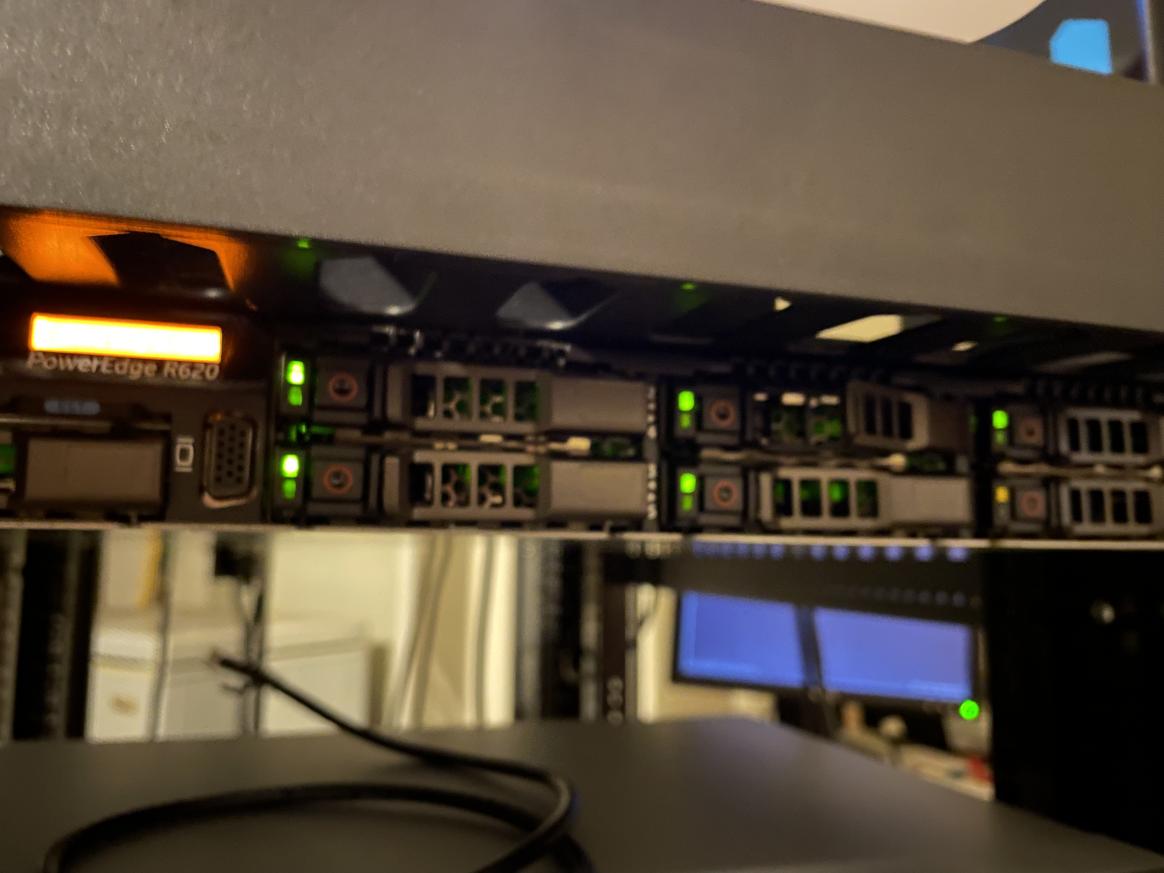
For those who haven't had the pleasure of seeing this before, the message is pretty straightforward.
Fault detected on drive 7 in disk drive bay 1
That explained quite a bit. The Factorio server was struggling because the backing physical disk was failing; DNS was out for the same reason. I tested this theory with a cursory check of several other systems as well, all of which showed similar issues. Some were reachable via SSH and some were not. Checking in on the ones that were not through the vcenter console showed varying errors and kernel panics, all associated with what you might expect when a running operating system has it's disk fail.
At this point I had a good idea that what had occurred was a disk failure that had cascaded into all of the services which used that particular disk failing. The severity of the failure was exacerbated because remember: everything I had was virtualized. But disk failures happen all the time, and they're not the most difficult problem to solve. Generally, it means replacing the drive and rebuilding the RAID VD. Depending on your setup it may mean a few hours offline, but other than the inconvenience it shouldn't have been a big deal. I pulled the disk and grabbed a new one, and then returned to my PC and connected to the server's IDRAC card to start the process. I navigated to the Storage page and saw a telling red X next to my VD which confirmed the theory.
Then I saw the RAID layout.
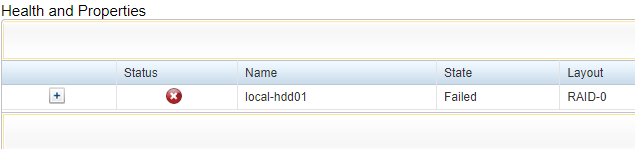
That didn't seem right. There was no way I would have created this array as RAID 0, given what it was used for.
Right?
In case your memory is fuzzy, RAID 0 is a RAID type which provides speed and capacity, but not redundancy. The loss of a drive in RAID 0 is not recoverable, because there is no parity drive from which it can be rebuilt.
Stunned, I hit refresh on the page over and over, as if hoping the number would magically change while it sank in that I had just lost a disk in a RAID 0 array that ran everything I had. My game servers, my databases, the files on my cloud server, 10 years of code and technical assets, 10 years of knowledge base articles and technical notes - not things that you could just search for when you needed them, but things you had to learn in practice. They were curated, searchable, and painstakingly created assets created over 10 years as I encountered things in the wild. And, it appeared, they were now gone.
Eating Your Own Dogfood
At this point I should explain part of my philosophy on why I have the lab in the first place. Most of what I do can be run on cloud services, so why bother managing it myself? There are three main reasons that I do this:
- I strive to protect my privacy online where I can; this is imperfect and there are tradeoffs sometimes, but generally in the consideration of using something myself versus using a service that I have to sign up for, I opt on the side of privacy.
- It is almost universally true - especially in the context of game servers, but true of most things - that performance and feature set are greater if you manage things yourself. Game servers can have more resources given for less of a cost, self-hosted applications have a greater feature set versus their cloud-based subscription model counterparts, and so on.
- The most important reason I have a lab is what some call "eating your own dogfood".
In the professional IT world, I evangelize automation, good hygiene, diligence, and discipline on a daily basis. Therefore, my thinking goes, I should actually practice these things myself. Otherwise, who am I to say whether or not these ideas actually work? If you're going to tell other people they should do a thing, you should actually do the thing yourself first to make sure it's a good idea. So, I run a lab which uses automation, abstraction of services, generally secure practices, and more.
It turns out, this phrase applies both to good and bad practice.
After hastily shutting down everything on the server, I plugged the drive in question in to my PC and ran some tests to figure out exactly how bad it was. It turned out that there were some bad sectors, but mechanically the disk seemed okay. That gave me a reasonable hope that if I was careful and speedy, I might be able to salvage most of what was now at risk. I returned the drive to the array and went into idrac to reimport it. After rebooting the server, it came online and showed as healthy. At that point I was relatively confident that I could get data off the drive.
One of the ideas that I evangelize is pretty straightforward: when something is bad, don't make things worse. This isn't unique to technology, but for those who have been (or are) somewhere that doesn't understand how to manage technical debt, you'll know immediately that it certainly applies. I realized that for whatever reason, I had ended up with a giant ball of technical debt that I was at severe risk of making worse:
- I had built my critical infrastructure on storage infrastructure that was not fault-tolerant, was not redundant, and was now failing.
- I had built my critical services (postgres, DNS, etc) on hosts that ran outdated OS versions which did not support the methods or tools that I was using to manage infrastructure today, and had not been updated or maintained.
- I had not built in backups for those systems, due to a mixture of time constraints and the risks/complexity involved with managing those legacy systems that were prone to failure.
I decided it was probably time to stop making things worse, so I formulated a plan to get out of the mess as painlessly as possible.
First, I ordered a QNAP NAS with 40TB worth of disks - at roughly $1500 it was not cheap, but I have always viewed these things as an investment in ongoing education and skills. And the potential loss of 10 years worth of information critical to my professional career was a good reason to not mess around with it. I also turned my DNS server back online, which allowed some of my automation to kick in again (though most of it remained inoperable due to either host issues or offline hosts being unreachable). I changed my upstream DNS servers for non-infrastructure hosts to public DNS, which restored internet connectivity and gave me an alternative option to my network DNS servers if something broke again. And lastly, I brought vcenter back online, which gave me access to a small but critical feature set to try and rescue the hosts.
The next morning my NAS arrived. In the spirit of "don't make things worse/always improve when you build", I also took the opportunity to bring in a 10Gbps direct connection between the NAS and the storage server. My switch unfortunately does not support 10Gbps throughput, but it's on my list to be upgraded in the next few months and I don't really need that yet until I add another server anyways. It took roughly an hour and a half or so to get things set up, and after all was said and done I had carved out three new volumes to use, on a RAID 5 storage pool.

This gave me log capture for storage access, a 20TB LUN to attach to vcenter as a datastore, and a 1TB volume I could attach to the different PCs and hosts on my network so I could stop having to search for USB drives every time I need to move a file. It also gave me some critical features like monitoring and alerting, snapshots, logging and audit, and some quality of life stuff like resource monitoring, LDAP integration (useful for service accounts and user PCs), and more. For the cost, it was well worth it and definitely fit the goal of improving the environment.
With a plan in place and the basics of a recovery environment set up, I was finally ready to start taking inventory of each server, and figuring out how much of it I would be able to rescue...
(Continued in Part 2)